Implementing WS Security Policies for your services on webMethods Integration Server - Prerequisites
Sunday, May 15, 2016SoftwareAG webMethods Integration Server provides a few out of box WS-Security policies to secure the messages to protect the authenticity and integrity of the messages. You can also create your own policies as long as the security assertions used in your policy are supported by SoftwareAG Integration Server.
To test the SoftwareAG support for WS-Security policies we need to do some basic setup which we will discuss in this post. Please bear with me as there are multiple steps to be executed to complete the setup.
1. Create a simple WSDL (HelloWorld.wsdl)
2. Using OpenSSL tool create the key stores and trust stores for client and server
(Do not use JDK keytool to generate the key pairs. It only generates v1 certs whereas SoftwareAG policies require v3 certificates
a. On the 'Server machine' create a provider descriptor for the wsdl and implement the 'sayHello' operation

c. Create provider web service end point alias on the server machine
 d. Associate the provider web service alias to the provider descriptor in the 'binding' tab

a. On the 'Client Machine' create a consumer service descriptor for the WSDL

b. Create the keystore and truststore aliases on the client machine

c. Create consumer web service end point alias on the client machine
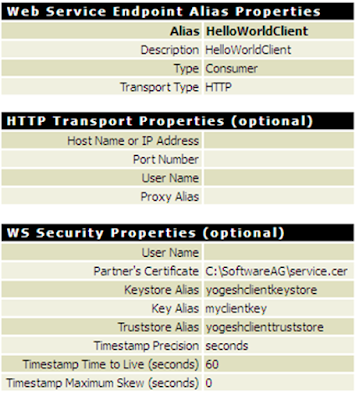 d. Associate the consumer web service alias to the consumer descriptor in the binding tab

e. Verify that the connector is invoking the service hosted on the server and receiving the response as expected

Apache TCPMon can be downloaded from http://ws.apache.org/commons/tcpmon/
a. In the TCPMon admin tab create a new listener

b. In the connector service on the client machine, use the TCPMon endpoint (instead of hitting the server machine endpoint) so that the traffic is routed through TCPMon.

c. Invoke the connector service and verify that TCPMon is able to monitor the traffic

In the screen above you can see complete request and response exchanged between client and server.
As seen in the TCPMon screen, if the message exchanges between client and server are not secure, you can ‘tap’ the message, modify and resend it, or it can even be used for ‘replay’ attacks.
This completes our setup.
To test the SoftwareAG support for WS-Security policies we need to do some basic setup which we will discuss in this post. Please bear with me as there are multiple steps to be executed to complete the setup.
1. Create a simple WSDL (HelloWorld.wsdl)
2. Using OpenSSL tool create the key stores and trust stores for client and server
(Do not use JDK keytool to generate the key pairs. It only generates v1 certs whereas SoftwareAG policies require v3 certificates
Setup on the Server side machine
We will designate one IS as a 'Server Machine'. This IS will host the HelloWorld service and act as a provider of the service. The service provides a 'sayHello' operation for the clients to invoke. The sayHello operation will simply respond to client by prefixing 'Hello' to the input string provided by client.a. On the 'Server machine' create a provider descriptor for the wsdl and implement the 'sayHello' operation

b. Create the keystore and truststore aliases on the server machine


Setup on the Client side machine
We will designate another IS as a 'Client machine'. This machine will consume the WSDL and invoke the 'sayHello' operation provided by 'HelloWorld' service hosted on the 'Server machine'a. On the 'Client Machine' create a consumer service descriptor for the WSDL


c. Create consumer web service end point alias on the client machine


e. Verify that the connector is invoking the service hosted on the server and receiving the response as expected

Setting up TCPMon
We will setup Apache TCPMon to monitor the traffic between client and server. This tool is very useful for any webservice or integration service developer.Apache TCPMon can be downloaded from http://ws.apache.org/commons/tcpmon/
a. In the TCPMon admin tab create a new listener


c. Invoke the connector service and verify that TCPMon is able to monitor the traffic

In the screen above you can see complete request and response exchanged between client and server.
As seen in the TCPMon screen, if the message exchanges between client and server are not secure, you can ‘tap’ the message, modify and resend it, or it can even be used for ‘replay’ attacks.
This completes our setup.